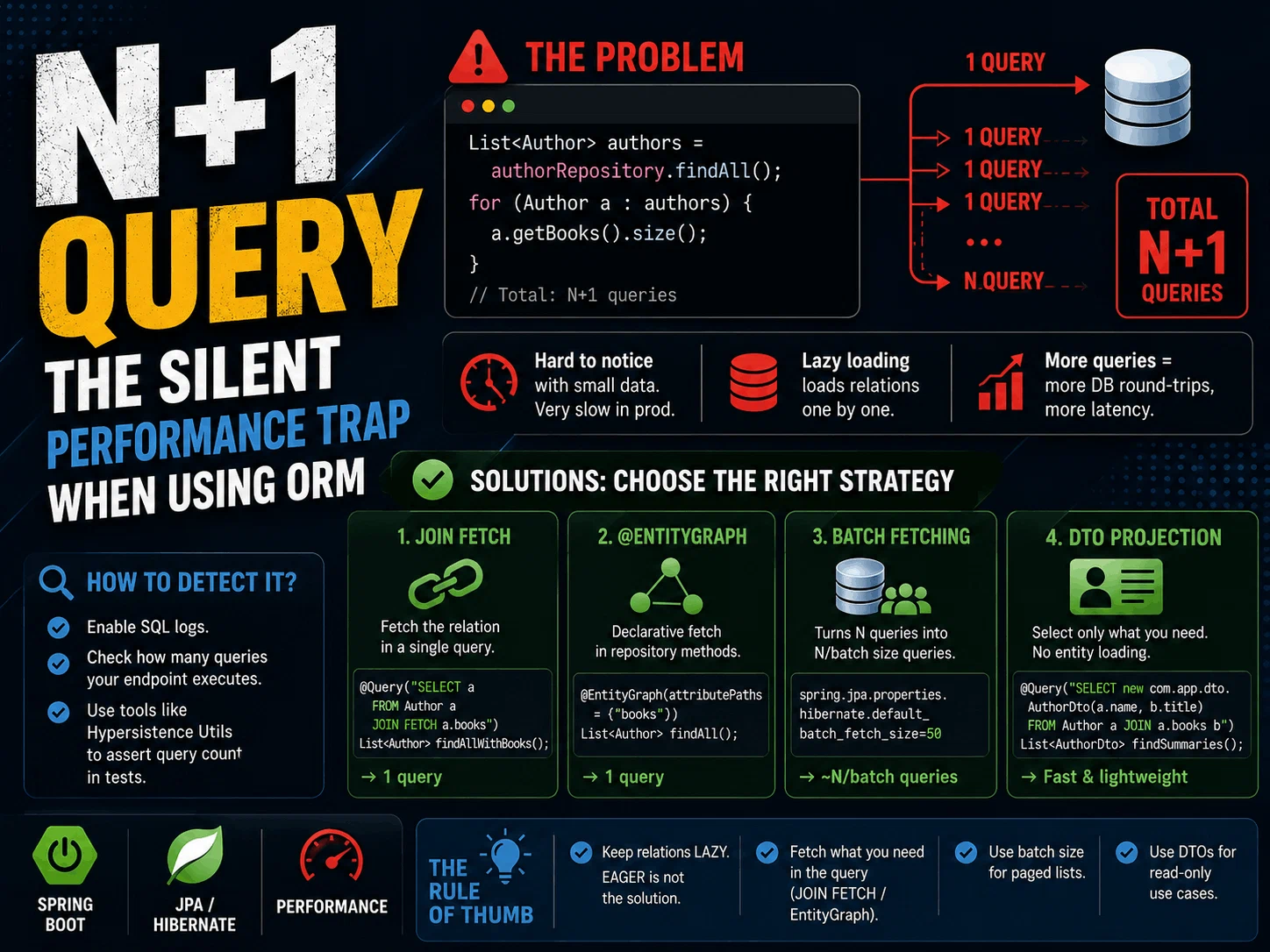
The N+1 query problem is one of the most common performance problems you meet when you use an ORM.
At first everything looks fine. You load the main records with one query. Then you touch a relation on each record, and Hibernate runs one more query in the background for every one of them.
The result:
1 main query + N relation queries = N+1 queries.
This is hard to see when you have little data. On your machine an endpoint with 10 records feels fast. In production, when the table grows to 10,000 rows, the same code can suddenly run hundreds or even thousands of SQL queries.
The examples here use JPA and Hibernate, but the problem is not specific to them. Entity Framework, Sequelize, ActiveRecord, Django ORM — every ORM that loads relations lazily has the same trap. Only the names and the syntax of the fixes change.
What the problem looks like
Say we have 100 authors, and a list endpoint returns every author along with their books:
public record AuthorResponse(String name, List<String> bookTitles) {}

List<Author> authors = authorRepository.findAll();   // 1 query

List<AuthorResponse> response = authors.stream()
        .map(author -> new AuthorResponse(
                author.getName(),
                author.getBooks().stream()           // 1 more query per author
                        .map(Book::getTitle)
                        .toList()))
        .toList();

// Total: 1 + 100 = 101 queries
The code looks harmless. You call findAll() once, then you put each author’s book titles into the response. There is not a single repository call inside the loop — which is exactly what makes this so easy to miss.
But this is roughly what Hibernate does:
graph TD
    A["authorRepository.findAll()"] --> B["SELECT * FROM author<br/>— 1 query"]
    B --> C{"getBooks() for<br/>every author in the loop"}
    C --> D["SELECT * FROM book WHERE author_id = 1"]
    C --> E["SELECT * FROM book WHERE author_id = 2"]
    C --> F["…"]
    C --> G["SELECT * FROM book WHERE author_id = 100"]
First the main query:
SELECT * FROM author;
Then one query per author:
SELECT * FROM book WHERE author_id = 1;
SELECT * FROM book WHERE author_id = 2;
SELECT * FROM book WHERE author_id = 3;
...
SELECT * FROM book WHERE author_id = 100;
So in total:
1 + 100 = 101 queries
This is exactly what the N+1 problem is.
Why does it happen?
In JPA and Hibernate, some relations are loaded lazily.
@OneToMany and @ManyToMany relations are LAZY by default. When you load the entity, the relation is not loaded with it. Hibernate puts a proxy or a collection wrapper there instead.
The moment you touch the relation for the first time, Hibernate runs a SELECT to get the real data.
For example:
List<Author> authors = authorRepository.findAll();
At this point the books are not loaded yet. But the moment you reach into the collection to read the titles:
author.getBooks().stream().map(Book::getTitle).toList();
Hibernate now sees that you really need the books, and sends a new query.
The distinction is a subtle one: calling getBooks() does not run a query on its own — it hands you a collection that has not been populated yet. What triggers the query is looking inside it: streaming it, iterating it, or calling size().
The problem shows up when you repeat that for every author:
for (Author author : authors) {
    responses.add(toResponse(author));   // getBooks() lives in here
}
If there are 100 authors, this can run 100 more queries.
It also happens the other way around
@ManyToOne and @OneToOne relations are EAGER by default. So when you call bookRepository.findAll(), Hibernate may send a separate query for the author of every book — even if you never touch the relation. This version of N+1 is harder to catch, because there is not a single line in your code that reads the relation.
The key point is this: you may not notice the problem when you have little data. When the data grows in production, the same endpoint starts to slow down.
How to fix it in Spring Boot and JPA
There is no single way to fix N+1. The right answer depends on the shape of your query, on whether you use pagination, and on what data you actually need.
These are the most common fixes.
1. JOIN FETCH — the most common fix
If you know that you need the related data, you can load it in the same query:
@Query("SELECT a FROM Author a JOIN FETCH a.books")
List<Author> findAllWithBooks(); // one query
Instead of loading the authors first and then running one query per author, Hibernate now loads the relation in the same query. The SQL is roughly this idea:
SELECT *
FROM author a
JOIN book b ON b.author_id = a.id;
So you get the job done with one query instead of N+1.
But there is an important detail here. If you fetch two different collections in the same query, the result set can grow a lot. For example:
Author
 ├── Books
 └── Awards
Fetching both books and awards in the same query can create a cartesian product and a very large result set.
MultipleBagFetchException
If you try to fetch more than one List collection in the same query, Hibernate throws MultipleBagFetchException. For an author with 10 books and 5 awards the result set would be 50 rows, and Hibernate cannot tell those rows apart, so it refuses up front.
If you need more than one collection, look at other options: separate queries, or a different collection type.
Why does using Set instead of List help?
In Hibernate, a List that has no order and can hold duplicates is called a bag. Fetching two bags at the same time makes it impossible to tell which row belongs to which collection, so Hibernate stops with MultipleBagFetchException.
With a Set there is no such limit:
@OneToMany(mappedBy = "author")
private Set<Book> books = new HashSet<>();

@OneToMany(mappedBy = "author")
private Set<Award> awards = new HashSet<>();
But this does not remove the cartesian product. It only stops Hibernate from complaining. The database still returns 10 × 5 = 50 rows, and Hibernate drops the duplicates in memory. If both collections are large, the real fix is separate queries or batch fetching.
2. @EntityGraph — a declarative fetch plan
You can also tell the repository method which relation to fetch, with @EntityGraph. Here is the same job written in two ways:
@Query("SELECT a FROM Author a JOIN FETCH a.books WHERE a.name LIKE %:name%")
List<Author> findByNameContaining(@Param("name") String name);
@EntityGraph(attributePaths = {"books"})
List<Author> findByNameContaining(String name);
Both give a similar result. @EntityGraph is handy when you use derived queries: you can say which relation to load without writing a separate JPQL query.
So instead of this:
List<Author> findByNameContaining(String name);
you can write this:
@EntityGraph(attributePaths = {"books"})
List<Author> findByNameContaining(String name);
3. Batch fetching — turning N queries into N/batch queries
Instead of sending one query per relation, you can ask Hibernate to load the relations in groups:
spring.jpa.properties.hibernate.default_batch_fetch_size=50
spring:
  jpa:
    properties:
      hibernate:
        default_batch_fetch_size: 50
Now, instead of loading the relations one by one:
SELECT * FROM book WHERE author_id = 1;
SELECT * FROM book WHERE author_id = 2;
SELECT * FROM book WHERE author_id = 3;
Hibernate can run grouped queries like this:
SELECT *
FROM book
WHERE author_id IN (?, ?, ?, ...);
For 100 authors this can mean about 2 batch queries instead of 100 separate ones.
This helps a lot when you use pagination together with fetch join. For example:
Page<Author> findAll(Pageable pageable);
Fetch joining a collection in a paged query like this can cause problems.
Pagination + collection fetch join
When you fetch join a collection, each author turns into as many rows as they have books. LIMIT 10 no longer means “10 authors”, it means “10 rows”, so the database cannot page the results correctly.
Hibernate then has to load the whole result set and do the paging in memory. It logs firstResult/maxResults specified with collection fetch; applying in memory. Depending on your version and on the hibernate.query.fail_on_pagination_over_collection_fetch setting, you may get an error instead of a warning. Either way, it is not what you want.
A cleaner option here is to run the main query with pagination and load the relations with batch fetching.
4. DTO projection — do not load an entity you do not need
On some screens you do not need the whole entity. For example, if a list screen only shows:
- the author name
- the book title
then loading the Author entity and all its relations is more work than you need. You can select only the fields you need into a DTO:
@Query("SELECT new com.app.dto.AuthorDto(a.name, b.title) FROM Author a JOIN a.books b")
List<AuthorDto> findAuthorSummaries();
This works very well on read-only list screens. You read only the columns you need from the database, and Hibernate does not have to manage an entity graph for you.
The one thing to watch is the shape of the result: this query returns one row per author-book pair, not the nested AuthorResponse from the top of the post. If you want the titles grouped under their author, you group in Java — but now over a list that came from a single query, with no extra round trips:
Map<String, List<String>> byAuthor = findAuthorSummaries().stream()
        .collect(groupingBy(AuthorDto::name,
                 mapping(AuthorDto::title, toList())));
If you do not want to write the full package name of the DTO inside JPQL, Spring Data’s interface projection does the same job:
public interface AuthorSummary {
    String getName();
    String getTitle();
}
Use it as the return type of the method, and Spring selects the fields for you.
So which one should you use?
Here is a simple way to think about it:
JOIN FETCH
You need the relation and you want it in one query.
Good when a specific use case has a clear, fixed fetch need.
EntityGraph
You use derived repository methods and want to define the fetch plan in a declarative way.
Batch Fetching
You use pagination, or you want the relations in separate but grouped queries.
DTO Projection
You do not need the entity and only read a few fields. One of the cleanest and fastest options.
The same thing as a table:
| Situation | Fix | Queries |
|---|---|---|
| One collection needed, no pagination | JOIN FETCH | 1 |
| Derived query, fetch plan should be declarative | @EntityGraph | 1 |
| Pagination is used, or more than one collection is needed | Batch fetching | 1 + N/batch |
| Read-only screen, entity not needed | DTO projection | 1 |
How do you notice N+1?
Sometimes the hard part is not fixing the problem. It is seeing it in the first place.
You can turn on SQL logs in your development environment:
spring.jpa.show-sql=true
logging.level.org.hibernate.SQL=DEBUG
Then call the endpoint and look at how many SQL queries it produced. If you see something like this in the logs:
select ... from author
select ... from book where author_id=?
select ... from book where author_id=?
select ... from book where author_id=?
select ... from book where author_id=?
...
there is a good chance you have an N+1 problem.
What matters is not whether each single query is fast. What matters is how many queries one request produces in total.
Do not think “each of these 100 queries takes 2 ms, so we are fine”. Database round trips, connection pool usage, network latency and growing data all add up.
You can also assert the query count directly in tests. Tools like Hypersistence Utils let you write a test that says “this endpoint may run at most 2 queries”. After that, N+1 cannot come back quietly — the test fails as soon as somebody adds a line that touches the relation.
Is EAGER a solution?
Usually not. The first idea that comes to mind is often this:
@OneToMany(fetch = FetchType.EAGER)
private List<Book> books;
“Do not make it lazy, just load everything up front.” But this is not a good way to fix N+1.
EAGER does not mean that every use case always needs the relation. One endpoint may only need the author, and loading the books there is wasted work. Worse, eager loading can create unnecessary joins or extra queries in other places.
EAGER is an annotation, not a query. The moment you put it on the entity, it affects every query that touches that entity — including the ones you do not know about. Fetching is a decision of the use case, not of the entity, so it belongs inside the query.
So it is healthier to keep relations lazy in general, and to say clearly at query level which use case needs which relation.
Rules of thumb
A few simple rules to keep in mind for N+1:
Keep relations lazy by default
Making them eager is not a real fix. It can just move the problem somewhere else.
Say in the query which relation the screen needs
Use
JOIN FETCHor@EntityGraphwhen you need it.Be careful with pagination and fetch join
Watch out for growing result sets and in-memory pagination, especially with collection fetch joins.
Think about batch fetching for paged lists
Loading the main records with pagination and the relations in batches is often the healthier option.
Use DTO projection on read-only screens
If you do not need the entity, do not load the entity.
In the end the goal is not “use a single query”. The goal is to know and control how many queries you send to the database.
This is one of the most dangerous sides of an ORM: your code can look short and clean while hundreds of SQL queries run behind it.
That is exactly why the N+1 problem is dangerous — one line in the code can mean hundreds of queries in the database.
Comments